
Loading...

Share


 Copied
WebWave Pros and Cons: An Honest Review
20 August, 2024

Carlos Dusan
Subscribe to Our Newsletter
Get the latest web development tips, SEO strategies, and industry insights delivered to your inbox.You are now subscribed to our newsletter. Thank you
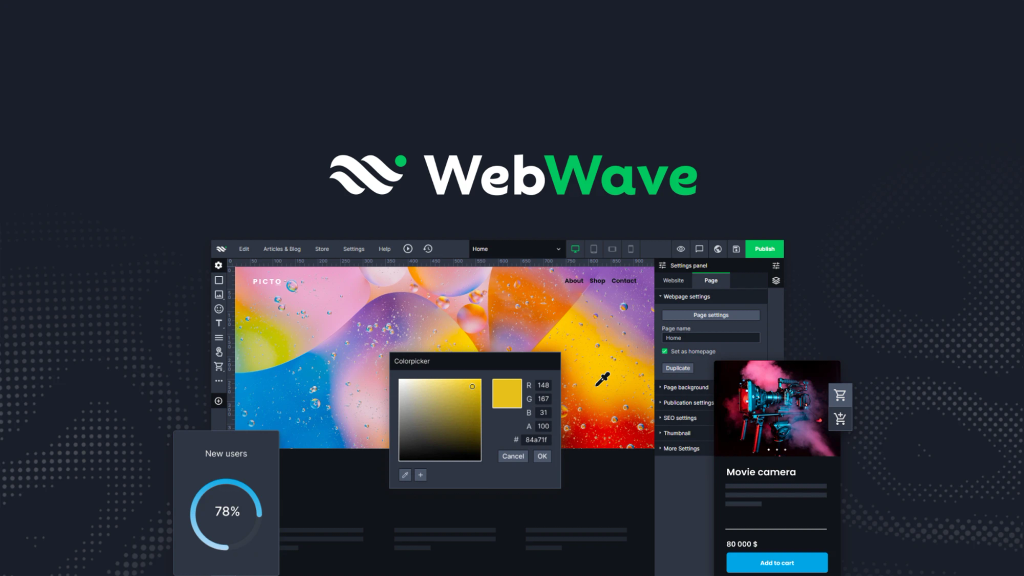
WebWave is a website builder designed to offer an intuitive and flexible web design experience. It aims to simplify the website creation process with its user-friendly interface and extensive customization options. Evaluating the pros and cons of such a platform is crucial before making a choice, as it can significantly impact your online presence and business operations.
In this article, you'll get an honest review of WebWave Pros and Cons. Expect to learn:
- What makes WebWave unique compared to other builders
- Detailed pros of using WebWave
- Potential drawbacks you should be aware of
- How WebWave stacks up against popular platforms like WordPress and Wix
- Specific insights for e-commerce businesses considering WebWave
By the end, you'll have a comprehensive understanding of whether WebWave fits your needs.
What Makes WebWave Stand Out?
WebWave, established by Maciej Czajkowski, emerged as a versatile website builder designed for both beginners and advanced users. Czajkowski envisioned a platform that simplifies web design without compromising on functionality. This vision has been pivotal in shaping WebWave into what it is today.
Key Features That Set WebWave Apart
1. Drag-and-Drop Interface
The intuitive drag-and-drop interface allows users to create stunning websites effortlessly. This feature makes WebWave accessible to those without extensive technical knowledge.
2. AI-Powered Website Generation
Uses AI to generate websites based on your input, saving you time and effort.
3. Extensive Customization Options
Users can enjoy granular control over their site’s design with customizable templates and advanced design tools. Layering options and animation settings provide a high degree of creative freedom.
4. Responsive Design Capabilities
Ensuring optimal viewing experiences across all devices, WebWave supports responsive web design. This capability is crucial for maintaining a professional look on smartphones, tablets, and desktops.
5. Robust E-commerce Features
WebWave includes strong e-commerce functionalities, enabling businesses to manage online stores seamlessly. Features like product catalog management, secure payment gateways, and shopping cart integration are particularly beneficial for online retailers.
6. SEO Optimization Tools
With built-in SEO tools, users can optimize their sites for search engines effectively. Although it may lack some advanced features like Google rich schema integration, the provided tools cover essential SEO needs.
Target Audience: Who Should Use WebWave?
WebWave is ideal for:
- Graphic designers
- Photographers
- Writers and bloggers
- Artists
- Small business owners
- Anyone looking to create a professional website without coding
Comparison with WordPress and Wix
WebWave distinguishes itself from popular website builders like WordPress and Wix through its unique combination of ease-of-use and advanced customization:
- WordPress: While known for its extensive plugin library and flexibility, WordPress requires more technical expertise compared to WebWave's user-friendly interface.
- Wix: Similar in terms of drag-and-drop capabilities but often seen as less flexible when it comes to deep customization options available in WebWave.
These distinctive features make WebWave a compelling choice for those seeking a balance between simplicity and powerful design capabilities. For anyone trying to decide which website builder suits them best, understanding these unique attributes can be instrumental in making an informed choice about the most suitable website builder for their needs.
Pros of Using WebWave
When considering the pros of using WebWave, several features emerge that cater to a diverse range of users, particularly small businesses and freelancers seeking efficient web solutions.
1. User-Friendly Interface
WebWave boasts a user-friendly interface characterized by its intuitive drag-and-drop functionality. Users can effortlessly create websites without needing extensive technical knowledge. This simplicity encourages creativity, allowing individuals to focus on design rather than complex coding. Small business owners often find it liberating, as they can get their sites up and running quickly without hiring a developer.
2. Extensive Customization Options
Customization is a hallmark of WebWave. The platform offers extensive customization options through a variety of templates and advanced web design tools. Users have granular control over settings, including animations and layout adjustments using layers. This flexibility means that businesses can tailor their online presence to reflect their unique brand identity, setting them apart in competitive markets.
3. Responsive Design Capabilities
In 2024, having a website that looks great on all devices is essential. WebWave excels in this area with its responsive design capabilities. Websites built on the platform automatically adjust to various screen sizes, ensuring optimal viewing experiences for all users—whether on desktops, tablets, or smartphones. This feature is particularly valuable for small businesses aiming to reach customers across multiple platforms.
4. Robust E-commerce Features
For those venturing into online sales, WebWave provides robust e-commerce features that facilitate seamless online store management. Businesses can easily set up product listings, manage inventory, and process payments—all within the same platform. This integration simplifies operations, allowing entrepreneurs to focus more on growing their business rather than handling logistical challenges.
5. Time-Saving Templates
WebWave recognizes the time constraints faced by small businesses and freelancers. The platform includes a library of time-saving templates designed specifically for various industries. Users can select a template that fits their needs and modify it as required. This feature not only accelerates the website creation process but also helps maintain professional aesthetics without sacrificing quality.
6. SEO Capabilities
While building an attractive site is crucial, visibility is essential too. WebWave offers basic SEO capabilities that assist users in optimizing their websites for search engines. While some may find these features lacking compared to specialized SEO tools, they provide enough foundation for small businesses to enhance their online presence effectively.
These pros highlight why many users find WebWave an appealing option when considering website builders tailored to meet diverse needs and preferences in today's digital landscape.
Cons to Consider When Choosing WebWave
Potential Performance Issues: One of the notable drawbacks users have reported is slower loading speeds compared to competitors. This can be a significant factor, especially for businesses relying on quick page loads to keep visitors engaged. While WebWave offers numerous features, the performance aspect sometimes lags behind leading platforms like WordPress or Wix.
Initial UI Complexity: WebWave's interface, although packed with powerful features, may present a steep learning curve for new users. Non-tech-savvy individuals might find it challenging to navigate through its initial setup and design processes. The platform’s extensive customization options and advanced tools can be overwhelming without proper onboarding resources.
Limited Third-party Integrations: Another limitation is threstricted access to third-party integrations. Unlike other website builders that offer seamless connectivity with a multitude of external services, WebWave's integration capabilities are somewhat constrained. This can be a hindrance for users looking to expand functionality beyond what the platform natively provides.
These cons highlight important considerations when evaluating WebWave as your website building solution. Balancing these potential issues against the platform’s robust features is essential in making an informed decision.
WebWave vs Other Popular Website Builders in 2024
When evaluating WebWave against other leading website builders like WordPress and Wix, several key differences emerge that can influence your choice depending on your specific needs and preferences.
WebWave vs WordPress
Functionality and Flexibility:
- WebWave offers a drag-and-drop interface, making it user-friendly for those without coding knowledge. Its customizable templates and advanced design tools provide significant control over the website’s appearance.
- WordPress, being an open-source platform, offers unparalleled flexibility with thousands of plugins and themes. However, it often requires more technical expertise, especially when dealing with complex customizations.
User Experience:
- For beginners, WebWave’s intuitive design can be less daunting compared to WordPress. The visual editor and built-in features make it easier for non-developers to create professional websites.
- WordPress excels for users who need extensive custom functionality or plan to scale their websites with additional features. It’s a robust platform preferred by developers due to its flexibility and vast community support.
WebWave vs Wix
Target Audience:
- WebWave is tailored for designers seeking granular control over every aspect of their website. Its layer-based editing system appeals to those who value precision in design.
- Wix, on the other hand, targets a broader audience including small businesses, bloggers, and e-commerce sites. Its AI-driven design assistance (Wix ADI) helps users create websites quickly without much manual input.
Feature Set:
- WebWave stands out with its white label options, allowing agencies to brand the platform as their own. It also provides a higher level of customization through detailed settings and animations.
- Wix offers a rich ecosystem of apps through its App Market, facilitating integration with various third-party services. This can be crucial for businesses needing specific functionalities not natively available in WebWave.
Choosing between these platforms depends largely on your technical skills, customization needs, and the type of website you wish to create. Whether prioritizing ease of use or expansive functionality will guide you toward the best fit among these top contenders in 2024.
Is WebWave Worth It for E-commerce?
When evaluating WebWave's e-commerce features, it's important to consider both the advantages and disadvantages specifically designed for online businesses.
Pros for E-commerce Businesses
- Intuitive Store Management: WebWave provides an easy-to-use interface that simplifies the process of adding, managing, and organizing products. This is particularly beneficial for small to medium-sized enterprises aiming to streamline their operations.
- Customizable Product Pages: The platform's extensive customization options allow businesses to create visually appealing product pages. For instance, you can utilize layers and animations to highlight special offers or new arrivals.
- Secure Payment Gateways: Integration with secure payment gateways ensures that transactions are safe, facilitating trust between the business and its customers. This feature is indispensable for any e-commerce platform.
- Responsive Design: Given that a significant portion of online shopping occurs on mobile devices, WebWave’s responsive design ensures a seamless shopping experience across all devices.
- SEO Tools: While not as advanced as some might hope, the available SEO tools help improve search engine rankings, driving organic traffic to your e-commerce site.
Cons Specific to E-commerce
- Performance Issues: Users have reported slower loading times, which can be detrimental to an e-commerce site where speed is crucial for conversions. For example, a user mentioned experiencing higher bounce rates due to slow page loads during peak shopping periods.
- Limited Integrations: The lack of robust third-party integrations may restrict businesses from using preferred tools like advanced inventory management systems or specialized marketing software.
- Publishing Delays: Some users find that changes made to their e-commerce sites are not instantaneously reflected, potentially causing discrepancies in product availability or pricing information visible to customers.
- Complex UI for Newcomers: The initial learning curve might be steep for those unfamiliar with web design tools, making it challenging for them to fully leverage the platform's capabilities right away.
WebWave's e-commerce features offer a combination of user-friendly functions and customization possibilities but have certain drawbacks that could affect business efficiency and customer experience.
Conclusion: Choosing the Right Website Builder for Your Needs
Selecting the right website builder depends on your specific needs. Consider these factors when evaluating WebWave:
- User Experience: Ideal for those who value design flexibility and customization.
- E-commerce Focus: Strong features for online stores, suitable for small businesses and freelancers.
- Performance vs. Complexity: Weigh the importance of easy navigation against potential performance issues.
WebWave is an attractive choice for users looking for a flexible platform, particularly in e-commerce. Evaluate your priorities to see if it matches your web design objectives.
Ready to create your own website? Try WebWave for free today and experience the power of AI in website building.